How Automation with ShareBuilder Assistant Can Do the Work of Dozens of AEs and Research Assistants with Data Enrichment
Sales teams don’t lose deals because they can’t sell. They lose deals because they can’t move, not fast enough, not confidently enough, and not with consistent information.
The hidden tax isn’t effort. It’s research whiplash:
- “Is this the right contact?”
- “Why did this email bounce?”
- “What does this company actually do?”
- “Do we have the right phone number, address, and website?”
- “What should I say in the first email?”
- “What’s the prospect’s likely pain point?”
When your CRM is full of stale or incomplete records, every rep becomes a part-time detective. That’s time that should have gone into discovery calls, proposal follow-up, and pipeline creation. ShareBuilder Assistant’s Data Enrichment flips that equation: it turns your CRM into a living, real-time system that stays clean, complete, and current, automatically.
The real bottleneck: manual research (and the compounding cost of bad data)
Bad data doesn’t just slow you down; it multiplies work:
- AEs chase the wrong people and redo outreach.
- Research teams spend hours building basic company context.
- Managers can’t trust pipelines or account intelligence.
ShareBuilder Assistant addresses the root issue: it automates sales research directly in ShareBuilder CRM, pulling trustworthy business and people data into the CRM, keeping it up to date, and giving everyone the same complete view without extra steps.
That’s where “doing the work of dozens” becomes real: it’s not about replacing humans, it’s about eliminating the repetitive, low-value tasks that quietly consume entire headcounts.
What Data Enrichment automates inside ShareBuilder CRM
1) Company profiles that are actually usable
Instead of a record that says “Acme Media” and a vague address, Data Enrichment builds complete & accurate company profiles with fields your team can filter, report on, and act on—like status, phone and address lists, operating hours, web domain details, and social profiles.
And it does it fast: the Assistant gathers details by scanning public websites, social channels, and other sources “in just a few seconds.”
Translation: your reps stop Googling, stop guessing, and start engaging.
2) Finding the right contacts instantly
One of the biggest time sinks in B2B selling is identifying the person (and getting accurate contact info).
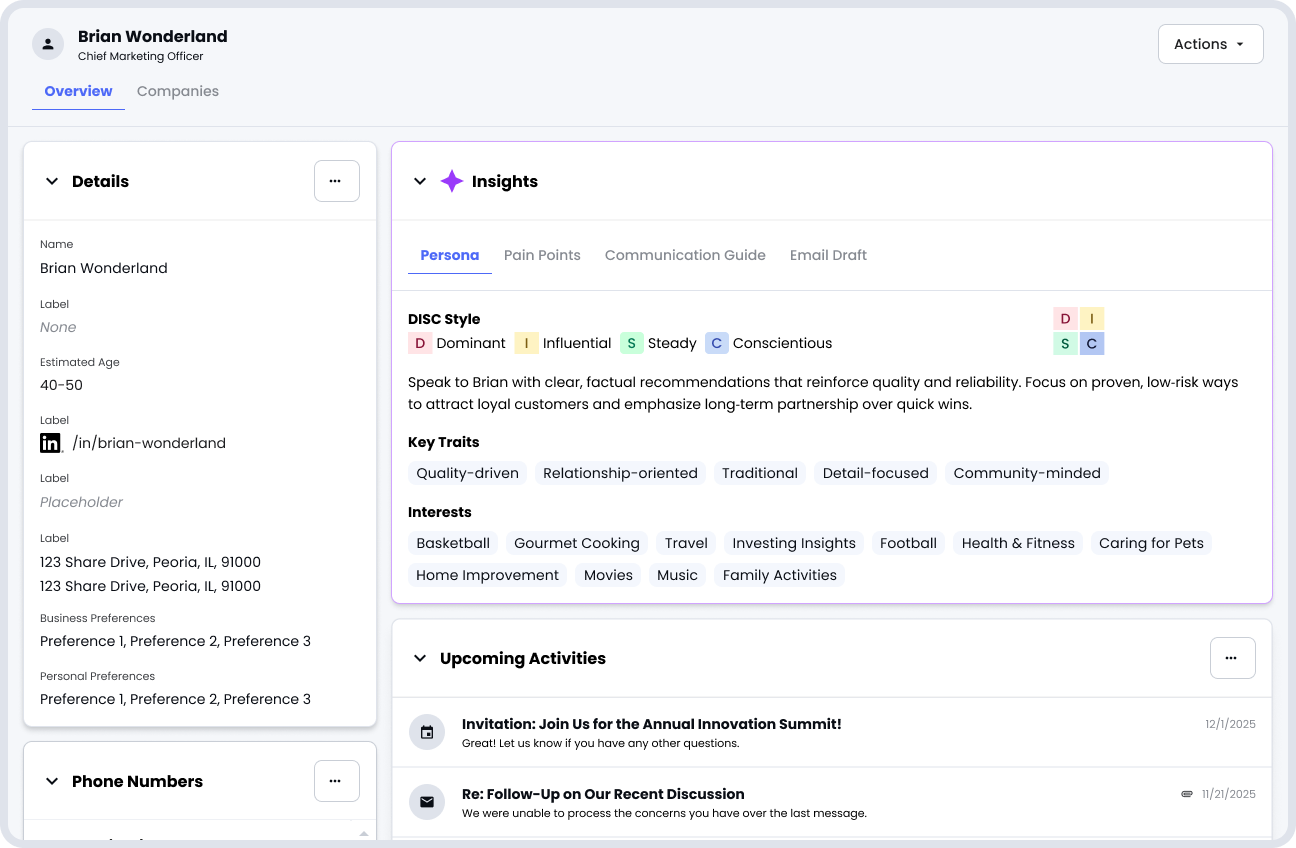
ShareBuilder Assistant can automatically find the right contacts when adding new companies and turn an email address, LinkedIn URL, or phone number into a full contact record, including the right email address, phone numbers, work history, and more.
Translation: less list-building, fewer bounced emails, more conversations.
3) Personalization at scale with AI Personas (DISC-style)
Even when you have the right person, personalization is hard to do consistently.
The Assistant creates a DISC-style persona snapshot for every enriched contact and summarizes how to tailor communication to their decision-making preferences, along with key traits and personal interests to help you connect.
Translation: your best reps’ instincts become repeatable across the whole team.
4) Real prospect context: pain points + recommended next steps
This is where enrichment becomes revenue acceleration.
By analyzing the company (industry, location, services, products, even website text), the Assistant infers likely pain points and suggests a tailored plan grounded in your media solutions (radio, TV, digital advertising).
Then it produces recommended research steps so reps know what to do before reaching out.
Translation: faster ramp for new reps, and more consistent discovery for everyone.
5) Better first conversations: questions and draft emails
Even with all the right data, sellers still face the blank page problem.
ShareBuilder Assistant generates:
- tailored discovery questions based on persona, pain points, and enriched company data
- draft warm emails (including subject lines) using available enrichment and insights, designed to align with communication style and pain points
Translation: reps spend less time writing and more time selling, without sacrificing quality.
The “dozens of AEs” effect: where the leverage actually comes from
Think about what really eats time each week:
- Researching accounts and contacts
- Verifying phone numbers and emails
- Updating CRM fields
- Preparing for the first outreach
- Writing emails and tailoring messaging
- Figuring out “what should I say next?”
Now, imagine those tasks are largely automated continuously within the CRM.
Even conservatively, if an AE saves 30–60 minutes a day on research and prep, that adds up to 2.5–5 hours per week per rep. Across 10 reps, that’s 25–50 hours/week returned to selling time. (Illustrative math, your results will vary based on process and data quality.)
The point isn’t the exact number. It’s the shift: your team stops operating like a collection of individuals and starts operating like a scaled system.
The takeaway: your CRM shouldn’t be a database; it should be a competitive advantage
When ShareBuilder Assistant keeps your data enriched and up to date, your reps stop wasting time searching, second-guessing, and stitching together context. Instead, they spend that energy where it matters:
- better first outreach
- deeper discovery
- faster cycles
- cleaner handoffs
- more accurate forecasting
If you want your team to operate as if you added headcount without actually adding headcount, automation with ShareBuilder Assistant’s Data Enrichment is one of the most direct paths.